

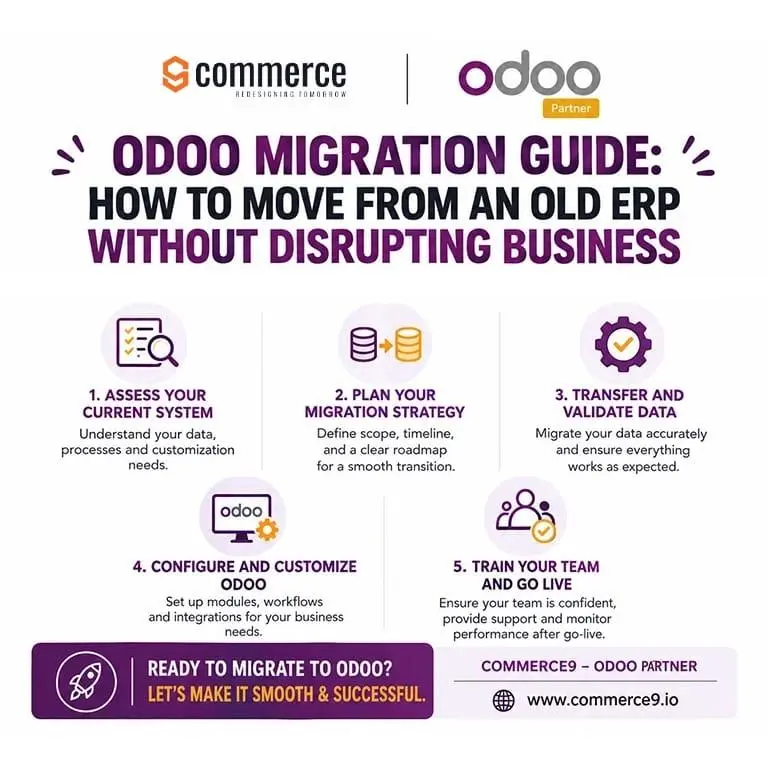
Are you still a member of an old, legacy Enterprise Resource Planning (ERP) system? Then it’s high time to upgrade to the next level: Odoo. It reduces costs, increases operational flexibility, and modernizes your technology and workflow. If you ask what is wrong with sticking with the legacy system, here are seven reasons: data silos and duplication, poor integration, declining data quality, excessive customisation, reliance on shadow systems, outdated AI and insights, and vulnerability to turnover.
A common doubt here is: won’t a migration affect daily workflow? No, it doesn’t. Cloned databases, staged development, short cutover windows, data cleanup, real-world testing, and post-launch support ensure continuity.
Understand Why You Need Odoo Migration
Odoo migration process is essential for three reasons: removing operational holdups, reducing high maintenance overhead, and supporting business growth. The migrations solve the following issues:
- Technical and Vendor Limitations – These limitations arise from end-of-support, ageing infrastructure, and integration barriers.
- Operational Inefficiencies – High dependence on manual work, lack of live data, and poor/complicated user experience can create inefficiencies.
- Growth and Financial Pressures – High pressure comes from business expansion, rising maintenance costs, and restructuring.
Odoo’s major takeaway is its features: modular design, no-code customisation, and open-source freedom. These features create a flexible, modular architecture, making it easier for any size business to start small and expand as they grow. Before you migrate to Odoo, clarify your business needs and goals. This ensures a smooth, effective migration.
Bonus tip: Our Odoo migration has some unique advantages for you. ERP upgrade that complies with IFRS 18, with built-in configuration, tax rules, and reporting features for businesses to comply with the United Arab Emirates’ 5% VAT regulations by the Federal Tax Authority (FTA), corporate tax, e-invoicing support, easy-to-use software, practical training and advisory support, time-saving, and compliance for better business decisions.
Review Your Existing ERP Data
Reviewing your current data avoids hidden errors, speeds up the transition, and prevents the clutter of the previous system. This takes place in four steps:
Step 1 – Complete Data Audit
Here you should list your datasets, classify critical data, and check system usage. In the listing, identify the main data and transactional records. While classifying critical data, determine the records needed for daily business operations. In the system usage, check active users, current permissions, and active modules.
Step 2 – Cleaning and Normalizing Your Data
This step includes removing duplicate data, archiving old records, and standardising formats. Move historical transactions, closed tickets, and inactive accounts, and correct inconsistent phone numbers, addresses, and date formats. These help Odoo read the data properly.
Step 3 – Mapping Data Fields
Here you align old fields to Odoo, verify data types, and review custom fields. To align your old fields, connect legacy fields to their correct Odoo counterparts. In your verification, check whether strings, numbers, and dates in the legacy system match Odoo’s expected field types.
Step 4 – Testing With Sample Batches
The final step is to create a backup, run a test migration, and check relationships. To run a test migration, import a small batch of cleaned records into a staging or testing environment. While checking, ensure smooth transfer of the linked records, such as customer invoices attached to the correct sales orders.
Choose the Right Odoo Version and Modules
Why do the right Odoo version and modules matter? They deliver a unified, cost-saving system that scales your business operations seamlessly. Listed below are the appropriate modules for certain industries:
Sales
- Odoo 19 or 20.
- Odoo Enterprise edition – advanced sales automation, mobile app support, integrated e-signatures, automated data cleaning, and official functional support.
- Suggested apps – Sales and CRM apps. Integrate them with inventory and accounting.
Accounting
- Odoo 18 or 19
- Odoo Accounting app model.
- Odoo Enterprise edition – complete accounting suite with AI-powered bank reconciliation, dynamic financial statements (balance sheet, profit & loss drill-downs), electronic invoicing (EDI), and multi-currency handling.
Inventory
- Odoo 19 with the built-in stock module ‘inventory’.
- Provides a redesigned inventory accounting subledger, route optimization, Master Production Scheduling (MPS), and improved real-time batch handling.
- Odoo Community edition is recommended for its free basic stock tracking
- Odoo Enterprise offers multi-warehouse management, advanced barcode apps, automated shipping connectors, and carrier integration.
- The core inventory model has two technical names – stock.quant and stock.picking, while the app name is inventory.
- Odoo 18 is also an alternate option if you want an established release with strong AI-first capabilities and cross-company tracking.
CRM
- Odoo 19 or 18 with the built-in stock module ‘crm’.
- Odoo 19 offers advanced AI-powered workflows, a business card scanner, scheduled emails, and improved lead management features.
- Odoo 18 offers a mature, highly stable environment with robust AI features.
- These versions are available in both Odoo Community Edition (Open-Source) and Odoo Enterprise Edition (Licensed).
- Odoo Community Edition – free to download and use, works best for Small businesses needing basic lead tracking, pipeline management, and activity scheduling, but has limitations such as no official vendor support, no mobile app support, and no advanced marketing automation integration.
- Odoo Enterprise – paid subscription based on users and provides full mobile access, data cleaning tools, VoIP integration, and official support.
Purchase
- Odoo 19 using the Odoo Enterprise licensing model.
- Offers dedicated AI modules, forecast-based buying, route optimization, and full active support. It is the best choice for new implementations.
- Odoo 18 and 17 are also considerable.
- Odoo 18 is only a fully functional choice in its second year. Odoo 17 is an older or soon-to-expire model that faces declining support windows and growing security maintenance debt.
- These versions are available in both Odoo Community Edition (Open-Source) and Odoo Enterprise Edition (Licensed).
- Odoo Community Edition – open-source edition, free to download with zero license costs, but it lacks official support, automated bank sync, and advanced features unless you pay for custom developer maintenance.
- Odoo Enterprise – paid subscription offering full mobile app access, advanced accounting features, automated upgrades, and official bug fixes. It operates on a predictable per-user subscription.
Manufacturing
- Odoo 19 – offers advanced shop floor control, real-time work orders, and improved operation costing.
- Best model – MRP (Material Requirements Planning).
- Odoo Enterprise is best for full-scale factories and growing businesses.
- It offers advanced work order tablets, barcode scanning, maintenance, quality management, and PLM (Product Lifecycle Management).
- It operates on a predictable per-user subscription.
Human Resources
- Odoo 19 – offers unified employee-contract management, advanced kiosk mode attendance, and integrated learning tools.
- The best models: hr.employee, hr.contract, hr.leave/hr.holidays, hr.attendance, hr.applicant/hr.job, and hr.appraisal.
- Choosing Odoo Enterprise is the best option.
Now, we come to the main plot – the Odoo migration guide.
Create a Clear Migration Plan
A clear Odoo migration plan is made for a smooth transition with minimal business disruption. There are four phases in a clear migration plan.
The first phase is assessment and scope definition. This phase evaluates the existing ERP, customizations, applications, and data requirements. The second Phase is Project Governance and Timeline. This establishes responsibilities, milestones, deadlines, and the cutover schedule. The third Phase is Testing and Staging. It uses sandbox environments, trial migrations, and user acceptance testing to identify issues. The last Phase is Training and Cutover. Here you should prepare employees, validate records, manage go-live, and provide post-launch support.
Clean and Prepare the Data
Proper data preparation consists of preparation, cleaning, and post-migration. Preparation is backing up the database and auditing existing data for duplicates, missing information, and inconsistencies. Cleaning includes removing duplicate records, correcting errors, standardizing names, product codes, addresses, categories, and units, and mapping legacy ERP fields to the correct Odoo fields. Post-migration maintenance is archiving outdated records and scheduling regular data-cleaning rules. Clean, consistent, and accurately mapped data reduces migration errors and provides a reliable foundation for efficient Odoo operations.
Test Before Going Live
Testing is done in six ways.
First, create a dedicated test environment before migrating your legacy ERP to Odoo. Next, duplicate the production database or create a test instance, and use Odoo Runbot to evaluate new versions and standard features. Then clean and anonymise sensitive data where required. Next, perform a trial migration instead of moving directly to the live system, then verify customer records, products, finances, inventory, and other data. Last, ask employees to test common workflows and identify issues. Resolve all errors before the final migration.
Keep Business Operations Running
Odoo migration minimises disruption by documenting daily workflows, automating repetitive tasks, and regularly reviewing performance metrics.
Scheduling major migration activities outside peak business hours whenever possible reduces operational impact.
When a complete migration becomes too risky, adopt a phased approach to transition processes gradually.
Keep the legacy ERP temporarily available for reference and verification when required.
Make your employees prepared for any issues by clearly communicating system changes, expected downtime, timelines, and new workflows.
Train Employees Before Launch
Employees must be confident with the new system for a successful Odoo migration.
First, build a structured training framework covering Preboarding & Setup, Core Knowledge & Tools, and Simulations & Launch Readiness. Next, introduce resources early, provide role-specific training on Odoo features and SOPs, and use practical examples and simulations to reinforce learning. Then, prepare quick guides for common tasks and conduct final dry runs before launch. Last, post-go-live, provide clear channels for reporting issues and receiving timely support.
Go Live and Monitor the System
This is the final step of the Odoo migration. Here, verified data moves into the new system, and critical configurations are checked. In a controlled environment before launch, test keys are processed across sales, inventory, accounting, and purchasing. After going live, monitor system performance, errors, and business processes using real-time monitoring tools. Activate technical support during the initial stabilization period to quickly identify and resolve issues, ensuring a smooth, reliable transition.
Common Odoo Migration Mistakes to Avoid
In your Odoo migration process, make sure to avoid these common mistakes:
- Lack of a detailed plan
- Migrating irrelevant data
- Skipping testing
- Excessive customization at the initial stage
- Not maintaining reliable backups and a contingency plan
Final Thoughts
Careful planning and execution ensure a smooth migration from a legacy ERP to Odoo. Odoo migration checklist includes data cleaning, thorough testing, employee training, and phased implementation. A well-structured migration improves operational efficiency, reduces manual work, streamlines processes, and creates a scalable foundation for future growth.
Commerce9, an Odoo partner in Dubai, specialises in ERP implementations, digital transformation, and intelligent business solutions to help organisations move beyond traditional ERP deployments toward scalable, AI-enabled systems that drive measurable business outcomes.
Contact us for Odoo Migration Services at +971 58 581 1523 or +971 58 586 6990 for any issues you face during implementation or upgrade.