

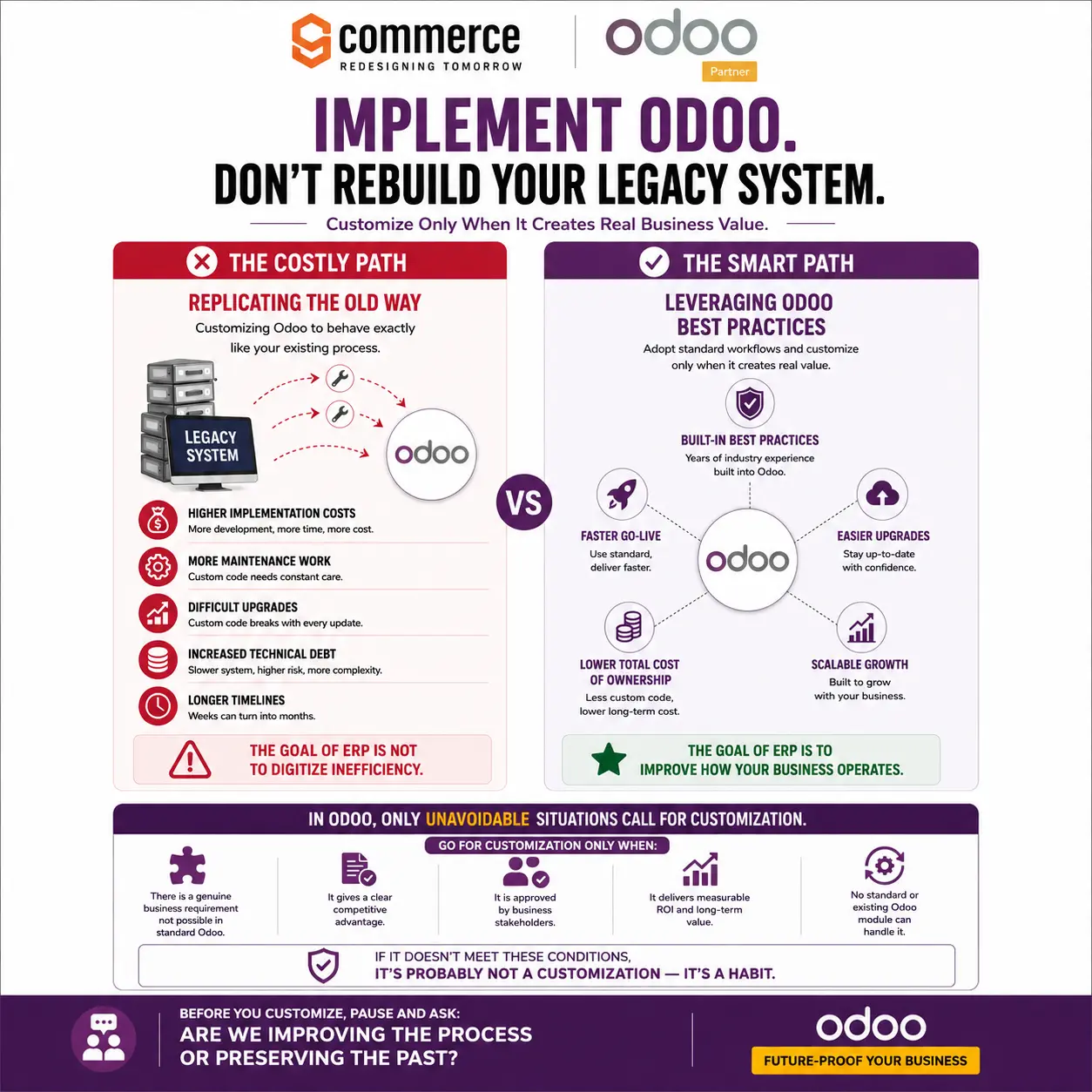
SAP ECC, R/3, Microsoft Dynamics GP, NAV, Oracle JD Edwards, and Oracle E-Business Suite (EBS) are common legacy systems businesses have been relying on for years. They do function, but they require costly maintenance and constant upgrades. These constant upgrades can sometimes be unnecessary, expensive, and complicated to rebuild.
This is where Odoo comes in. And why choose Odoo over legacy systems is a common question. Odoo ERP integrates business workflows, automation, and built-in best practices to smooth and simplify operations. Odoo provides standard features, so you need to rebuild only when you have a genuine expansion requirement. In short, implement the basics and customise in the future according to your expansion.
What Is a Legacy System?
A legacy system is an outdated software application, hardware configuration, or IT architecture used for operating core business processes, even if it doesn’t align with modern standards. The downsides of legacy systems include outdated technology, difficulty maintaining them, limited integrations, higher support costs, slower processing, and difficulty upgrading.
Legacy systems may follow old codebases, and the hardware may lack modern security patches. This makes the systems vulnerable to new cyber threats. This can cause the system to fail to match current processing speeds. Three issues make legacy systems difficult to maintain. A limited number of engineers who know old programming languages, difficulty in accessing replacement parts for legacy hardware, and poor documentation extend bug-fixing time.
The older a system gets, the more complicated and restricted its integrations become. Integration issues include old APIs that don’t connect to cloud applications, data trapped in closed silos, and failure to share real-time data with new software.
Rebuilding or maintaining a legacy system can be costly for three reasons: high emergency vendor fixes, constant attention to custom workarounds, and a high maintenance budget for aged hardware. Legacy systems often process slowly because batch processing slows the daily data updates, data entry is done manually, and lagging user interfaces waste workers’ time.
Upgrading here is difficult. Patching one module breaks another feature. Data migration can cause massive loss or corruption, and total system replacement charges huge upfront capital. This is general knowledge about legacy systems. When it comes to legacy system vs Odoo, millions of small, mid-sized, and large businesses choose legacy systems because they think recreating familiar workflows is easier and better than adapting to better, standardised processes. The major con here is that it can lead to unnecessary customisation and higher implementation costs.
The Common Mistake: Rebuilding the Legacy System in Odoo
Businesses often try to simplify the whole Odoo workflow by replicating the existing legacy software functionality in Odoo. Six common mistakes can happen while rebuilding a legacy system in Odoo:
Higher implementation costs – Comprehensive rebuilding can be expensive, which can increase the overall implementation budget.
More development work – Replication requires additional coding, configuration, testing, and integration efforts.
Increased maintenance – Rebuilding may require custom code, which creates additional maintenance requirements and complicates troubleshooting.
Difficult future upgrades – Upgrading to Odoo’s new versions or features may require additional work.
Longer implementation timelines – Rebuilding can extend the Odoo implementation time.
More technical complexity – The more customisations you include, the harder it becomes for the system, users, developers, and administrators to manage.
Why Implementing Odoo Is the Smarter Approach
There are five reasons to why choose Odoo over legacy systems.
Use Odoo Standard Workflows
Odoo’s standard workflow features include sales, CRM, accounting, inventory, manufacturing, and HR. So, after implementation, evaluate these features and then consider customisation. These features offer advantages, including rapid deployment, cost efficiency, seamless upgrades, faster employee adoption, error reduction, process consistency, and real-time visibility.
Faster Go-Live
Odoo reduces development and configuration time. This speeds up the team’s system implementation and access to its benefits. Features include modular phased rollout, pre-built applications, low customisation overhead, high user intuitiveness, and unified data structure.
Lower Total Cost
The standard features minimise custom code, reducing development, maintenance, and support expenses. It also saves you from buying unnecessary features that do not offer real results.
The unified ecosystem, pay-as-you-grow model, competitive pricing, standard-first mindset, low-code building, predictable deployment, core engine updates, no expensive rewrites, and shorter training cycles reduce total cost, simplify upgrading, and help the business add modules, users, and capabilities according to growth.
Easier Upgrades
Extreme customisation complicates future Odoo upgrades. Maintaining standard functions and features makes it easier to adapt to newer versions, updates, and features.
The advantages include modular separation, automated migration tools, standardised architecture, and a frequent release cycle. These advantages save businesses from technical debt and breaking changes of traditional legacy ERP migrations. You can make the upgrades easier by minimising core hacks, leveraging staging environments, and adopting out-of-the-box features only when necessary.
Scalable Growth
Odoo’s standard features are scalable enough to adapt to evolving business requirements. You can add modules, users, and capabilities without rebuilding the entire system. Feature advantages include modular progression, cost efficiency, unified data ecosystem, built-in automation, and global expansion support.
Legacy System vs Odoo: Quick Comparison
| Comparison Factor | Legacy System | Odoo |
| Technology | Rigid, outdated, and monolithic on-premises architecture. Older technology and outdated architecture | Modern, modular, open-source stack built on Python and PostgreSQL, made for cloud and API-first flexibility. |
| Implementation | Long, complex, and costly custom code deployments. Often requires extensive rebuilding and complex migration. | Modular, agile approach with pre-built apps that reduce implementation time and expenses. Can be implemented using standard modules and workflows. |
| Customisation | Requires costly, rigid, and complex core code changes. Highly dependent on custom-built features. | Layered, modular, and low-code flexibility through built-in tools like Odoo Studio. Customizable when genuine business requirements arise. |
| Maintenance | High manual effort, custom patches, and rare legacy skills. Can be costly and difficult to maintain. | Automated updates, modular app upgrades, and a vast community ecosystem. Easier to maintain and upgrade. |
| Integration | Rigid, custom-coded, point-to-point connections, which break easily during updates. May have limited integration capabilities. | Unified database, modular architecture with robust APIs facilitating seamless data flow. Supports integrations with various business applications. |
| Scalability | Fixed limits on server power, high cost for new hardware, and slow updates for new sites. Scaling can require significant technical changes. | Easy cloud growth, pay only for extra users, add new business apps fast, and handles high data traffic well. Easily scalable as business needs evolve. |
| Automation | Rigid, siloed, and batch-updated process. Requires expensive custom workarounds. Often relies on manual processes or separate tools. | Agile, native, and real-time cross-functional automation from a single unified database. Built-in automation streamlines repetitive workflows. |
| Data Management | Uses separate, isolated databases, causing silos and duplicate entry. Data may be fragmented across multiple systems. | Uses a single, centralised database, providing real-time data flow and unified tracking across all business apps. Centralised data across integrated business functions. |
| Cost Efficiency | High ongoing maintenance, expensive upgrades, and infrastructure overhead. Increasing maintenance and upgrade costs. | Modular, subscription-based or free open-source model that reduces the total ownership cost. More predictable and cost-effective over the long term. |
| Business Agility | Slow update cycles, high customisation friction, and isolated data. Difficult to adapt to changing requirements. | Flexible app integration, real-time data flow, and fast deployment cycles help businesses create instant strategies. Flexible workflows support changing business needs. |
Conclusion
By now, the answer to why choose Odoo over legacy systems is clear. The transition from a legacy system to Odoo modernises, simplifies, and enhances your business operations. Through this upgrade, you can remove unnecessary processes, automate workflows, and create more efficient operations. The transition begins with implementing Odoo’s built-in features and workflows. Rebuild or customise when your existing system becomes outdated for expansion.
Commerce9 is an Odoo partner in Dubai, is known for providing smart ERP consultation services. We help you implement, rebuild, and create scalable Odoo solutions to optimise project-based manufacturing and improve overall operational performance. Let’s connect for a free consultation.